Script Modding
Although not included, it is not very hard to implement script modding through Mod Enabler. The hardest thing is finding a framework that works with Unity and also fits your requirements. In the following example we're going to use MoonSharp, a lua interpreter, as our scripting engine.
Firstly, we are going to create a very basic script that will print a message to the Unity debug console. The contents of this script is going to be:
print("Test script works!")
Now we are going to save this script in the mods folder as Scripts/test.lua. Now pack the folder in your favourite archive creation program. In the end the archive should look something like the following:
-- Scripts.zip
   |-- Scripts
   |   |-- test.lua
Now it's time to create a new MonoBehaviour, lets call it ScriptLoader, and add it to an object in the scene. Now open the script and paste the following in it.
using ModEnabler;
using MoonSharp.Interpreter;
using System;
using UnityEngine;

public class ScriptLoader : MonoBehaviour
{
    public const string scriptsFolder = "Scripts/";

    private void Start()
    {
        if (!ModsManager.modsLoaded)
        {
            ModsManager.onModsLoaded.AddListener(Start);
            return;
        }

        Script engine = new Script(CoreModules.Preset_HardSandbox);
        engine.Globals["print"] = (Action<object>)Debug.Log;

        foreach (var mod in ModsManager.modsList)
        {
            if (mod.active)
            {
                var entries = mod.GetFilesInFolder(scriptsFolder);

                foreach (var entry in entries)
                {
                    Debug.LogFormat("Loading script '{0}'", entry.name);

                    string entryContents = ModsManager.settings.encoding.GetString(entry.bytes);    // Converting the entry contents to a string
                    engine.DoString(entryContents, codeFriendlyName: entry.name);
                }
            }
        }
    }
}
If you now press play in Unity, you should get a message in the console.
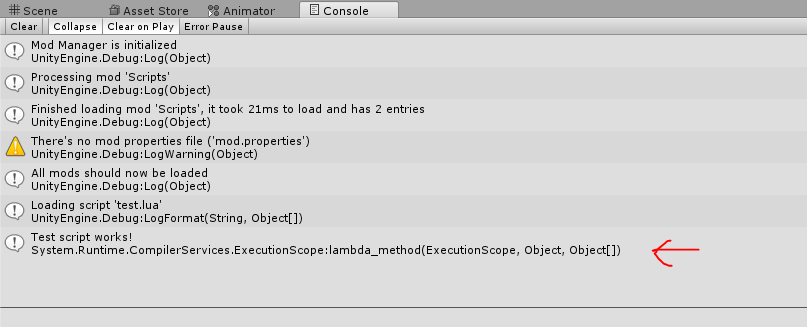
But, with the way it's done now, it doesn't support activating and deactivating mods. For that to work, we need to add some extra logic.
using ModEnabler;
using MoonSharp.Interpreter;
using System;
using UnityEngine;

public class ScriptLoader : MonoBehaviour
{
    public const string scriptsFolder = "Scripts/";

    private Script engine;

    private void Start()
    {
        if (ModsManager.modsLoaded)
        {
            Init();
        }
        else
        {
            ModsManager.onModsLoaded.AddListener(Init);
        }

        ModsManager.onModActivate.AddListener((mod) => LoadFromMod(mod));
    }

    private void Init()
    {
        engine = new Script(CoreModules.Preset_HardSandbox);
        engine.Globals["print"] = (Action<object>)Debug.Log;

        foreach (var mod in ModsManager.modsList)
        {
            LoadFromMod(mod);
        }
    }

    private void LoadFromMod(Mod mod)
    {
        if (mod.active)
        {
            var entries = mod.GetFilesInFolder(scriptsFolder);

            foreach (var entry in entries)
            {
                Debug.LogFormat("Loading script '{0}'", entry.name);

                string entryContents = ModsManager.settings.encoding.GetString(entry.bytes);    // Converting the entry contents to a string
                engine.DoString(entryContents, codeFriendlyName: entry.name);
            }
        }
    }
}
As you can see it isn't too hard to add script modding to your game. There are a lot of scripting engines out there and converting the scripts from above shouldn't be too hard. For example, with IronPython it could be as easy as this:
ScriptEngine engine = Python.CreateEngine();

globalScope = engine.CreateScope();
globalScope.SetVariable("print", new Action<string>(Debug.Log));


foreach (var mod in ModsManager.modsList)
{
    if (mod.active)
    {
        var entries = mod.GetFilesInFolder(scriptsFolder);

        foreach (var entry in entries)
        {
            ScriptSource source = engine.CreateScriptSourceFromString(
                ModsManager.settings.encoding.GetString(entry.bytes),    // Converting the entry contents to a string
                SourceCodeKind.File);

            CompiledCode compiled = source.Compile();
            compiled.Execute(globalScope);
        }
    }
}